Part 2: Routing Mastery
Mastering dynamic routes, parallel routes, and intercepted routes.
In Next.js 15, folders are routes and files are pages. This convention-based approach eliminates the need for a separate routing configuration — your project structure is your route map.

File-Based Routing
Every folder inside app/ becomes a URL segment. A page.tsx file inside that folder makes it publicly accessible:
app/
├── page.tsx            → /
├── about/
│   └── page.tsx        → /about
├── posts/
│   ├── page.tsx        → /posts
│   └── [slug]/
│       └── page.tsx    → /posts/my-first-post
└── series/
    └── [slug]/
        └── page/
            └── [page]/
                └── page.tsx  → /series/my-series/page/2
Dynamic Routes
Square brackets denote dynamic segments. The parameter value is passed to your component:
// app/posts/[slug]/page.tsx
interface Props {
  params: Promise<{ slug: string }>;
}

export default async function PostPage({ params }: Props) {
  const { slug } = await params;
  const post = await getPostBySlug(slug);

  return <article>{post.title}</article>;
}

export async function generateStaticParams() {
  const posts = await getAllPosts();
  return posts.map((post) => ({ slug: post.slug }));
}
The generateStaticParams function tells Next.js which pages to pre-render at build time, enabling fully static output.
Layouts
Layouts wrap pages and persist across navigation. They're defined with layout.tsx and receive children as a prop:
// app/layout.tsx — Root layout (required)
export default function RootLayout({
  children,
}: {
  children: React.ReactNode;
}) {
  return (
    <html lang="en">
      <body>{children}</body>
    </html>
  );
}
Nested layouts compose naturally. A posts/layout.tsx wraps all post pages without affecting the rest of the site.
Parallel Routes
Parallel routes let you render multiple pages in the same layout simultaneously, using named slots:
app/
└── dashboard/
    ├── layout.tsx
    ├── page.tsx
    ├── @analytics/
    │   └── page.tsx
    └── @activity/
        └── page.tsx
The layout receives each slot as a prop:
export default function DashboardLayout({
  children,
  analytics,
  activity,
}: {
  children: React.ReactNode;
  analytics: React.ReactNode;
  activity: React.ReactNode;
}) {
  return (
    <div className="grid grid-cols-2 gap-4">
      <main>{children}</main>
      <aside>{analytics}</aside>
      <aside>{activity}</aside>
    </div>
  );
}
Intercepted Routes
Intercepted routes display a route within the context of another route — perfect for modals. The (.) convention intercepts a sibling route:
app/
└── posts/
    ├── page.tsx
    ├── [slug]/
    │   └── page.tsx        → Full post page
    └── (.)  [slug]/
        └── page.tsx        → Modal overlay when navigating from /posts
When a user clicks a post link from the listing page, the intercepted route renders as a modal. If they navigate directly to the URL or refresh, they see the full page.
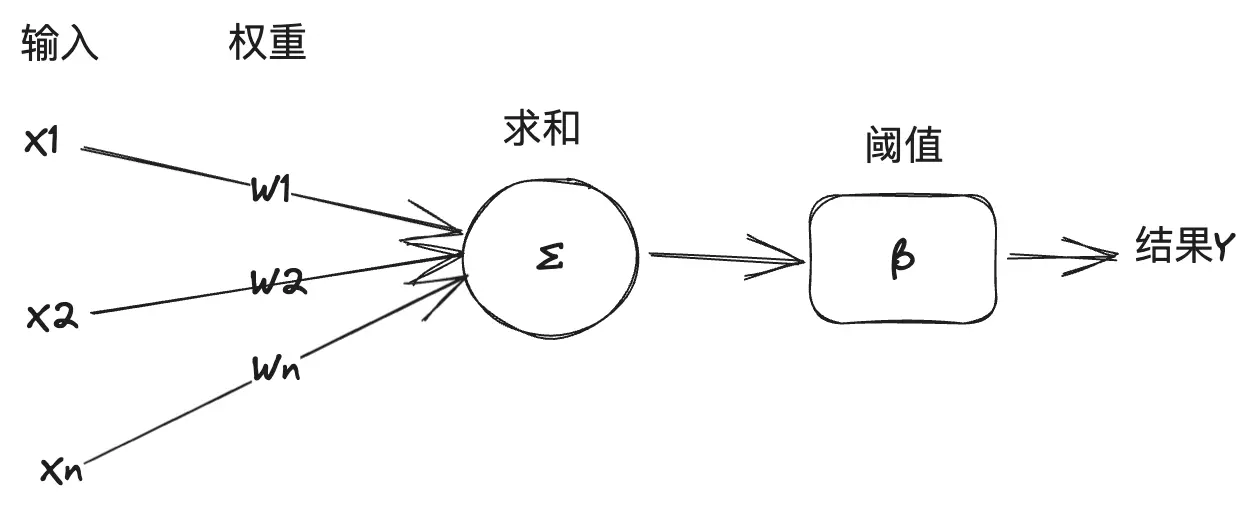 M-P-Model
Summary
Next.js routing is built on a few simple conventions that scale from a single-page site to a complex application. The file system does the heavy lifting — no router configuration, no route registration, just folders and files.